ISA Source Certification Renewals

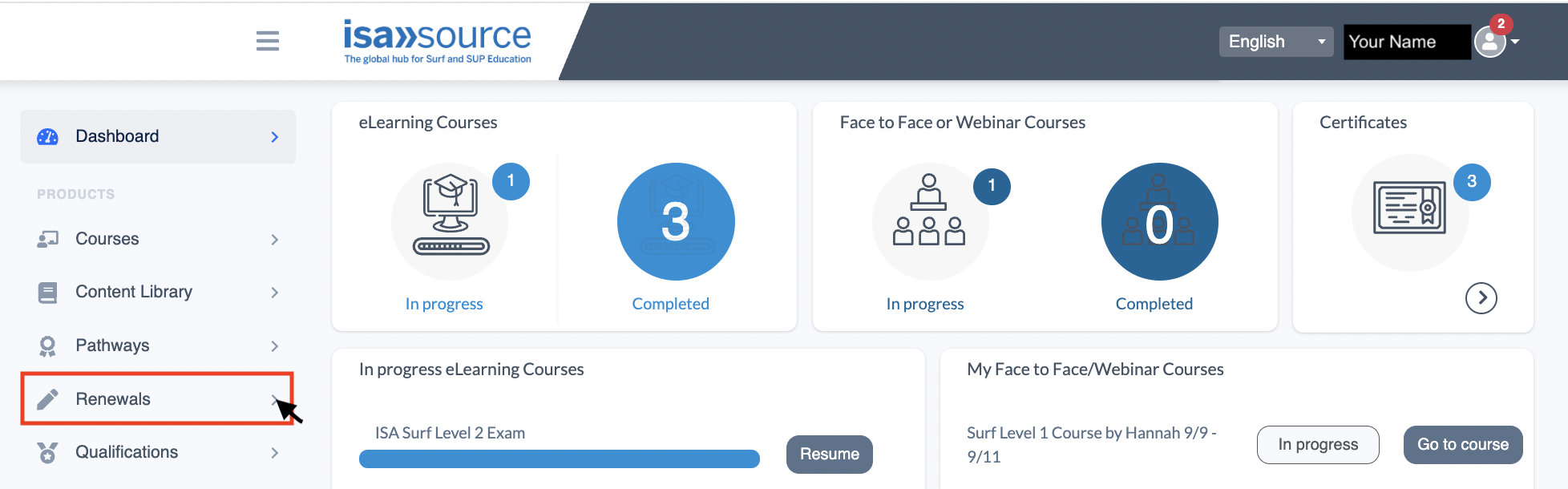
ISA Coaching and Judging Certification renewal orders can now be placed directly in your ISA Source Profile. You can log in now and visit the “Renewals” tab to complete your renewal requirements.

Click the below guides to learn more about how to complete a renewal in ISA Source.
  • Coaching and Instructing Renewals

    ISA Coaching and Instructing Certificates are valid for one (1) year and are eligible for renewal annually.

    Renewal requirements include:

    • Payment of Renewal Fee: $125 USD (includes all coaching certificates held but excludes Adaptive Instructor)
    • Upload of Valid and Current Surf Rescue/Water Safety Certification
    • Completion of minimum one (1) Continuing Professional Development (CPD) Credit via ISA Source (see below for more information)
    • Sharing your coaching stats

    Your certificate status will be “Not Current” if you do not complete all renewal requirements before the certificate expiry date. A certificate can remain “Not Current” for up to three (3) years before the certificate becomes completely “Expired” and ineligible for renewal.

    Step-by-Step Guide for Renewing:

    Step 1: Log in to ISA Source
     
    Step 2: Visit the Renewals tab in your account.

     
    Step 3: Select a coaching certificate to renew.
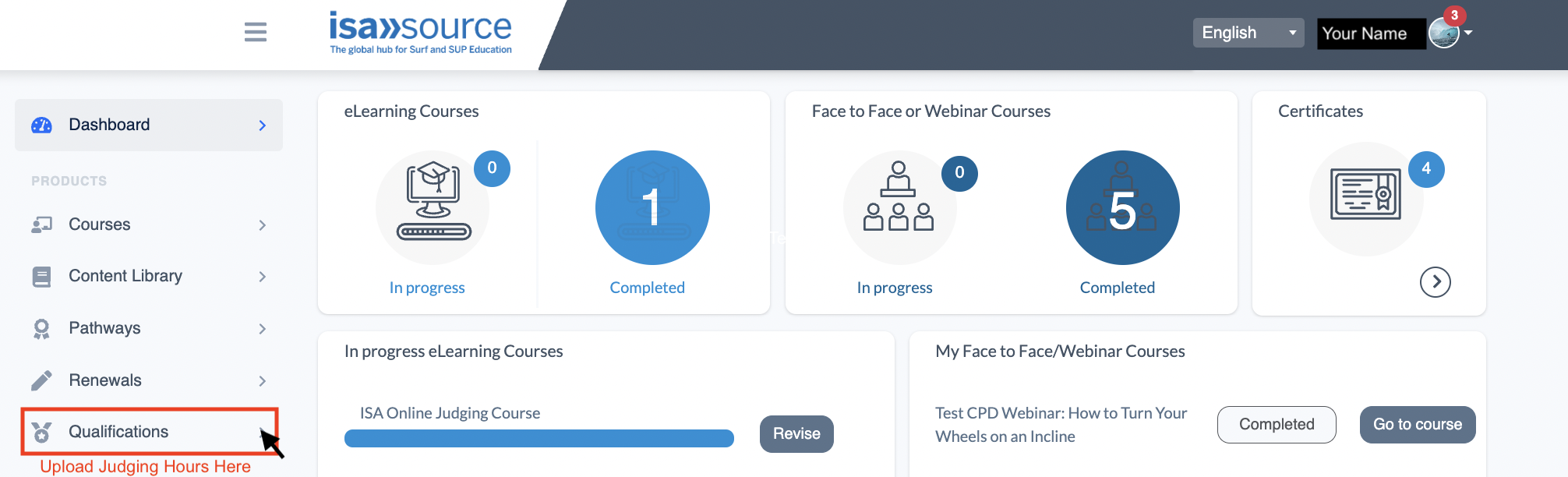
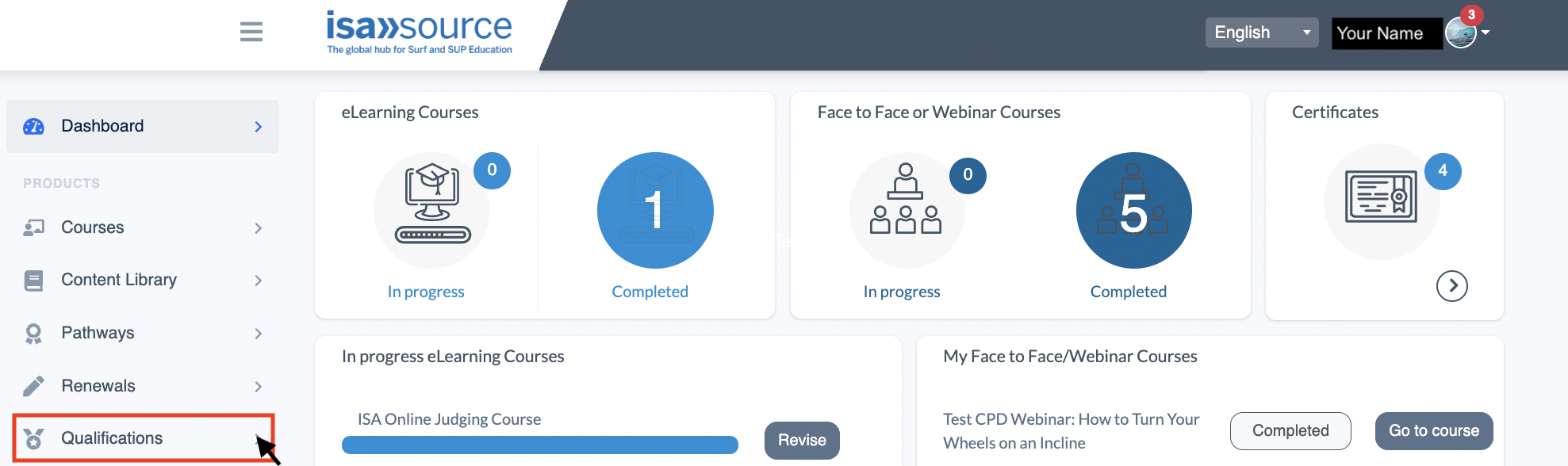
    If you don’t see your coaching certificate listed here, visit the Qualifications tab to upload your past award to your profile.
     
    Step 4: Complete each renewal requirement by clicking on the blue action button to the right of the requirement then finishing the task.
    Water Safety Certificate Upload: If you hold a valid ISA/ILS Water Safety Award in your ISA Source profile, your Water Safety Document Upload will automatically be Complete. If you hold an alternative Surf Rescue award, you must upload the certificate for approval. Our team will then check the award for validity before approving it. Please note the uploads are reviewed twice per week, which may result in a slight delay in completing your renewal process.

     
    Step 5: Once all items are “Complete”, your Qualification Status will be “Current”.Please note you may need to refresh the page once complete to download the new certificate. Your name will also appear on our public Directory Page within 24 hours.
     

    Notice: ISA Coaching Certificates can only be renewed for up to three (3) years after expiry.

    If your coaching award has been expired for over three years, please enroll in the ISA Refresher Training E-Learning Course to become re-qualified. Please CLICK HERE TO LEARN MORE.

  • Judging and Officiating Renewals and Level Upgrades

    ISA Judging and Officiating Certificates are valid for one (1) year and are eligible for renewal annually.

    Renewal requirements include:

    • Payment of Renewal Fee: $50 USD
    • Sharing your judging stats

    Step-by-Step Guide for Renewing:

    Step 1: Log in to ISA Source
     
    Step 2: Visit the Renewals tab in your account.

     
    Step 3: Select a judging certificate to renew. If you don’t see your judging certificate listed here, visit the Qualifications tab to upload your past award to your profile.

     
    Step 4: Complete each renewal requirement by clicking on the blue action button to the right of the requirement then finishing the task.
     
    Step 5: Once all items are “Complete”, your Qualification Status will be “Current”. You can visit your “Dashboard”, then click the “Certificates” box to download your new certificate. Your name will also appear on our public Directory Page within 24 hours.

    How do I level up?

    To submit your judging hours for an increased level of judging certificate:

    Step 1: Visit the Qualifications tab in your ISA Source account.

     
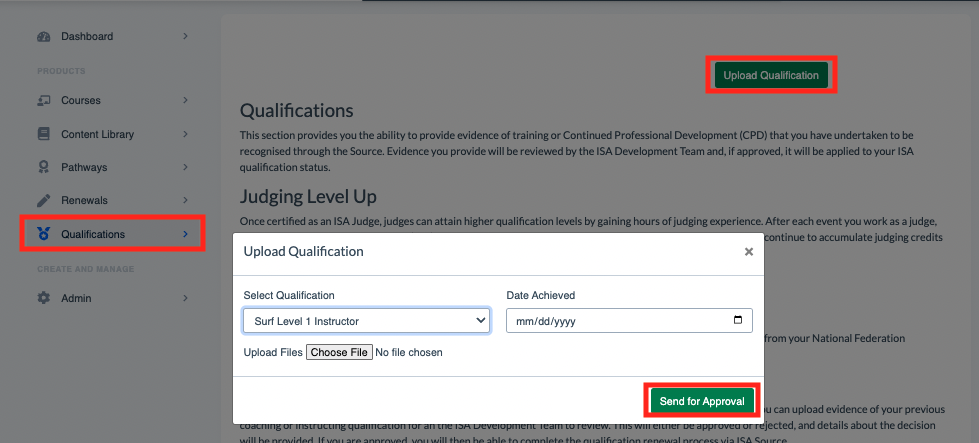
    Step 2: Upload your judging hours log. When uploading, please select the level you are applying for, not your current level.
     
    Step 3: Our team will review your hours log. If approved, you will see “Approved” next to the upload. If rejected, you will see “Rejected” next to the upload with feedback on how the document can be revised.
     
    Step 4: Once you have uploaded enough hours to reach the next level, your judging certification level will be increased.

  • What is Continuing Professional Development (CPD)?

    We believe the learning journey continues well beyond your initial ISA Certification Course. As an ISA Certified Coach or Instructor, you have access to opportunities to continue your surf or SUP education via webinars and e-learning courses.

    In order to be eligible for annual renewal of your certificate, you must complete a minimum of one (1) Continuing Professional Development credit. This can be achieved by participating in any of our coaching webinars, which are free to register for ISA certified coaches and are open to the public for a fee.

    Upcoming Webinars

  • I Don't Have an ISA Source Account Yet / I Don't See My Qualifications in My Profile

    ISA Source connects the global surf and SUP community to resources that develop coaching, judging, and professional skills in the surf industry. It is free to create an account and explore the course offerings and content library.

    All coaches and judges who have been certified in the past two years should already have an ISA Source profile. You can LOG IN HERE to view your profile and check your certification status.

    If you previously took an ISA course but were not certified via ISA Source, you can start your profile today via the below steps.

    Create Your ISA Source Profile:

    Step 1: CLICK HERE to create an ISA Source account
     
    Step 2: Complete the registration steps by filling out your information and activating your account.
     
    Step 3: If you hold an expired ISA Certificate that you would like to track in your profile, click the “Qualifications” tab to upload it.

     
    Step 4: Select the qualification you’re uploading and send for approval.

     
    Step 5: If approved, you will see your qualification status uploaded to your “Renewals” section. If rejected, you will receive feedback on why. Please note these are only reviewed twice per week, so there will be a slight delay between upload and approval.
     
    Step 6: Visit the “Renewals” tab and complete the steps for renewal, as outlined above.
     

Your cart

No products in the cart.

Privacy Overview

This website uses cookies so that we can provide you with the best user experience possible. Cookie information is stored in your browser and performs functions such as recognising you when you return to our website and helping our team to understand which sections of the website you find most interesting and useful.